Isolated 8.5 X 11 Open Book Mockup: Elevate Your Designs
Why This Mockup is a Game-Changer for Creatives
If you've ever struggled to present your book cover or interior layout designs in a professional, realistic setting, you know the frustration. A flat image just doesn't capture the depth, texture, and tangible feel of a real book. The Isolated 8.5 X 11 Open Book Mockup solves this problem elegantly. It’s a high-resolution, photorealistic template designed specifically for creators who need to showcase their work with clarity and impact. Whether you're a self-publisher finalizing your Amazon KDP listing, a designer building a portfolio, or a marketer creating promotional assets, this mockup provides the visual credibility your projects deserve.
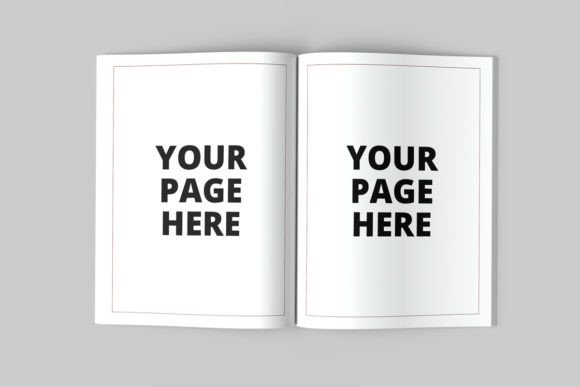
At its core, this is a premium design asset that blends practicality with aesthetic appeal. The mockup features an open book with clean, crisp pages, isolated against a customizable background. The PSD file is meticulously organized, with smart objects that make placing your artwork as simple as a double-click and a drag. The dimensions—3000 x 2000 pixels at 300 DPI—ensure your final images are sharp enough for both digital displays and high-quality prints. It’s not just a template; it’s a tool that adapts to your creative workflow.
Real-World Applications: From Online Shops to Social Media
Where does this mockup truly shine? Think about your online presence. For Amazon KDP sellers, having a premade Amazon KDP A+ content ready mockup can significantly enhance your product listing. Instead of a simple flat cover, you can present your book as a physical object, which builds trust and helps potential buyers visualize the product in their hands. The 8.5 x 11 inch format is a standard for many print-on-demand services, making this mockup directly applicable without guesswork.
Beyond e-commerce, consider your social media graphics. Instagram, Pinterest, and Facebook feeds are crowded. A visually compelling image of an open book featuring your design can stop the scroll. Use it to announce a new release, share a preview of your interior layouts, or showcase client work. The ability to change the background color or use one of the four included wooden backgrounds means you can tailor the look to match your brand’s color palette or the mood of your campaign. It’s a versatile component for your brand identity toolkit.
For designers and agencies, this mockup is invaluable for editorial design and packaging design presentations. Showcasing a magazine spread, a children’s book, or a workbook in a realistic context communicates professionalism to clients. It bridges the gap between digital proof and final product, helping stakeholders understand the design's physical presence.
Integrating the Mockup into Your Design Process
Getting started is straightforward, but a few best practices can maximize your results. First, ensure you have Adobe Photoshop installed. The included “How to use” TXT file will guide you, but the process is intuitive: open the PSD, locate the smart object layer, paste your design, and save. The mockup’s well-organized layers allow for easy adjustments to shadows, lighting, and background elements.
When preparing your design for the mockup, consider readability. If you’re showcasing interior text, ensure your font size and leading are appropriate for an 8.5 x 11 inch page. While this isn’t a serif font or sans serif font discussion, the typography within your book must be legible when viewed in the mockup’s context. Test your layout at 100% zoom in the smart object to catch any potential issues.
Think about font pairing if your design includes multiple typefaces. The mockup itself is neutral, so it won’t clash with your aesthetic. Whether you’re working with a modern typography style, a script font for a romantic novel, or a bold display font for a cookbook, the mockup will present it faithfully. This makes it a reliable partner for any creative font choice.
Practical Tips for a Polished Final Presentation
To truly make the mockup work for you, pay attention to the details. Use the background color option to create contrast that makes your book cover pop. If you’re using a wooden background, consider how the texture complements your genre—a rustic wood might suit a historical fiction, while a clean, light wood could enhance a wellness journal.
For those selling design assets or offering logo design services, this mockup can become part of your own marketing materials. Showcase how a logo might look on a book cover or as part of a broader brand identity system. The commercial license allows you to use the final images in your portfolio, on your website, and in client presentations, adding a layer of professionalism to your work.
Remember, the goal is to create an image that resonates with your audience. A well-presented mockup does more than display a design; it tells a story. It suggests quality, attention to detail, and a finished product. By leveraging the Isolated 8.5 X 11 Open Book Mockup, you’re not just showing a file—you’re offering a glimpse of the experience your audience will have when they hold your creation in their hands.