Stop Reinventing the Wheel: The Client Welcome Packet Template
Let’s be honest: the gap between landing a new client and actually starting the work is often filled with chaos. You have the contract signed, the invoice paid, and now you need to send over a mountain of information. You’re copy-pasting from old Word documents, trying to make your fonts match your logo, and hoping the PDF you send doesn’t look like a ransom note. It’s messy, it’s unprofessional, and frankly, it’s exhausting. You know you need a cohesive system, but who has the time to design one from scratch?
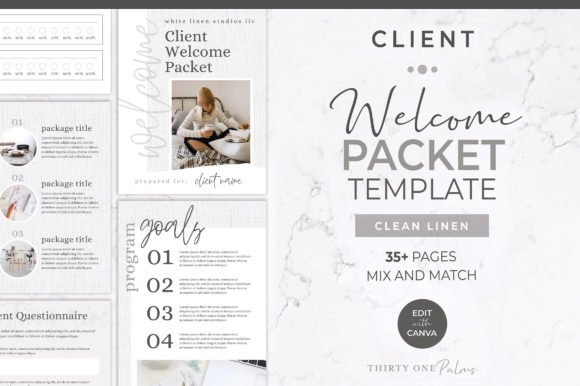
This is exactly where a high-quality Client Welcome Packet Template changes the game. It isn't just a collection of pretty pages; it is a strategic design asset built for Canva that serves as the foundation of your client experience. We are talking about a 35-page mix-and-match system designed to take you from "scrambling" to "sophisticated" in minutes. Because your brand identity shouldn't drop off a cliff once the contract is signed.
The Aesthetic: Why Visual Consistency Matters
The visual personality of this specific Client Welcome Packet Template is rooted in a "modern editorial" aesthetic. It balances clean, structured layouts with organic, textured elements—specifically the signature White Linen texture that provides a tactile, high-end feel. This isn't sterile, corporate minimalism. It feels warm, inviting, and expensive. It uses a blend of bold display font choices for headers to grab attention, paired with highly legible sans serif font or serif font styles for body text to ensure readability.
Why does this matter for your business? Because design assets influence perception. When a client opens a PDF that utilizes strong visual hierarchy—where the headings guide the eye and the information flows logically—they subconsciously view you as an expert. The template utilizes modern typography trends to create a rhythm on the page. You’ll notice the interplay of weight and space; it uses negative space not as empty room, but as an active design element to prevent cognitive overload. This is crucial for documents that are dense with information, such as terms of service or program outlines.
Strategic Applications Beyond the "Welcome"
While the primary use case is onboarding, the versatility of these 35 pages extends far into your brand identity ecosystem. The true value of a premium Canva template lies in its adaptability. Here is how you can leverage this asset across different facets of your workflow:
- Editorial Design & Proposals: If you are pitching a large project, use the "Program Outline" and "Timeline" pages to structure a proposal. The cohesive layout transforms a standard offer into a persuasive sales tool.
- Digital Products & Lead Magnets: Have a workshop coming up? You can strip out the client-specific info and use the goal-setting worksheets and styled text layouts to create a downloadable PDF for your audience. It positions you as a publisher, not just a service provider.
- Social Media Graphics: Need to share a quick tip or a client testimonial? Pull a single page from the packet, isolate a text block, and export it as a PNG. Instantly, you have an Instagram post that looks like it was designed by a pro agency.
- Internal Branding: Use the structure to create standard operating procedures (SOPs) for your team. Consistency in internal documentation boosts team morale and efficiency just as much as external docs impress clients.
Typography and Readability: The Technical Backbone
We need to talk about the typeface choices. In a document like this, where you are outlining terms, contact info, and services, readability is king. A common mistake in web design and document creation is prioritizing style over substance—using a complex script font or handwritten font for body text. This template avoids that trap. It reserves the decorative creative font styles for accents and headers, ensuring that the meat of your content is digestible.
When you open this in Canva, pay attention to the font pairing logic. The designers have already done the heavy lifting of matching a heavy, authoritative header with a lighter, airy body text. This creates a clear hierarchy that directs your client’s eye exactly where you want it. You don't need to be a graphic design expert to understand that a 12pt serif font is easier to read in long paragraphs than a 12pt all-caps sans serif. This template respects those rules, allowing you to focus on the message rather than the mechanics of typesetting.
Customization: Making It Yours in Canva
The barrier to entry for professional design is lower than ever, and this Client Welcome Packet Template is proof of that. You do not need Adobe InDesign or a subscription to expensive, advanced software. All you need is a free Canva account. However, "easy" does not mean "magic." To get the most out of this asset, you need to approach the editing process with a strategy.
Start with your brand identity. Before you change a single word, update the Brand Kit colors. Swap the placeholder colors with your primary and secondary palette. Then, tackle the fonts. If your brand uses a specific premium font that you’ve purchased, upload it to Canva and apply it to the headers. If you are sticking with free fonts, try to match the "vibe" of the template—keep a bold geometric sans for headers and a clean serif for the body.
Remember the visual assets. The "White Linen" texture is a fixed design element that gives the document its high-end feel, but you can swap out the placeholder images. If you are a photographer, drop in your portfolio shots. If you are a coach, use lifestyle imagery that reflects your client's aspirational state. The layout is designed to accommodate both text-heavy pages and image-centric spreads, giving you the flexibility of a full packaging design suite for your digital services.
Practical Checklist for Launching Your Packet
Before you hit "share" or "download" on your new packet, run through this quick sanity check to ensure you are presenting a professional front:
- The Flow Test: Read through the document as if you are the client. Does the intro letter set the right mood? Does the timeline make sense immediately following the scope of work?
- The Link Audit: Ensure your email address, social media handles, and booking links are hyperlinked. In a digital PDF, static text is a missed opportunity.
- The Mobile Check: Most clients will open this on their phones first. Zoom out to 50% in Canva. Is the text still readable? Is the contrast high enough?
- The Legal Review: Ensure your terms and conditions are accurate. A pretty document with incorrect legal info is a liability.
Ultimately, this Client Welcome Packet Template is more than just a PDF; it is a statement about how you run your business. It signals that you value organization, aesthetics, and the client experience. By utilizing a cohesive system of modern typography and structured layouts, you remove the friction from onboarding and start every relationship on the right foot. Save your time for the work that matters, and let the template handle the presentation.